Calmlyss: A Webflow Template for Yoga & Wellness Websites
calmlyss-webflow-template-yoga-wellness-websites
Someone finds your yoga studio on Instagram, taps the link in your bio and lands on your website. The page loads slowly, the class times are buried in a PDF, and there is no clear way to book a first session. They don't email to ask what's on this week. They simply close the tab and book with the studio down the road, and you never even know you lost them.
For wellness businesses, the website is often the first real experience a new client has with you, long before they step onto a mat. It should feel like your space does: calm, clear and welcoming. That's exactly what Calmlyss, a Webflow template built by Ink Studio for yoga studios, wellness coaches and mindfulness centers, is designed to do. In this guide, we'll walk you through what it includes, who it's for, how each page works, and how to launch your own wellness website with it.
What Is Calmlyss?
Calmlyss is a Health & Wellness website template for Webflow, listed on the Webflow Marketplace as "Calmlyss – Health & Wellness Website Template" for $99 USD. It gives yoga studios, wellness coaches, holistic therapists and mindfulness centers a ready-made, fully editable website with the pages a wellness business actually needs: classes, schedules, teachers, pricing, events and a blog, all connected in one Webflow project.
It ships with 10+ designed pages and 40+ flexible sections, built with Webflow components and variables. That means you can change colors, fonts, images and content without rebuilding layouts, and every update stays consistent across the whole site. You can explore every page before you buy on the Calmlyss live demo, and compare it with other designs in the Ink Studio Webflow template collection.
Who Calmlyss Is Built For
Calmlyss sits in the Spa and Health & Nutrition categories on the Webflow Marketplace, and its structure is shaped around how wellness businesses actually sell their services. Instead of a generic business layout with a few yoga photos dropped in, every page is planned around classes, teachers, memberships and events. It suits these four types of businesses best:
Yoga studios: group classes, workshops and memberships.
Wellness coaches: private sessions, transformation programs and ongoing guidance.
Holistic therapists: breathwork, meditation, sound baths and healing practices.
Mindfulness centers: retreats, events and community activities.
It works just as well for a solo instructor launching a first website as for an established studio with a team of teachers and a full weekly timetable. Because the content lives in the Webflow CMS, you can start small with two or three classes and one teacher profile, then add more practices, instructors and articles as your business grows, without changing the design.
Why Your Wellness Website Needs a Calm, Clear Design
People looking for yoga, breathwork or therapy are usually looking for relief from stress, from pain or from a busy life. If your website feels cluttered, slow or confusing, it works against the very feeling you're selling, and visitors leave before they ever see your schedule. A good wellness website has to do three jobs quickly, ideally within the first few seconds of a visit:
Builds trust: real teachers, real credentials and real stories from students.
Answers the practical questions: what classes you offer, when they run, how long they take and what they cost.
Makes the next step obvious: book a class, start a membership or get in touch.
Calmlyss is built around those three jobs. Soft colors, generous spacing and elegant typography set a peaceful mood from the first screen, while clear sections and repeated calls to action like "Book Class", "Explore Classes" and "Start Monthly" keep visitors moving toward a booking. The result is a site that feels relaxed to browse but is still focused on turning visitors into students.
A Tour of the Calmlyss Pages
Calmlyss covers the full journey a new client takes, from discovering your studio to choosing a class, meeting the teacher and signing up for a membership. Here's what each of the main pages gives you out of the box, and how it helps you present your wellness business with clarity.
Home
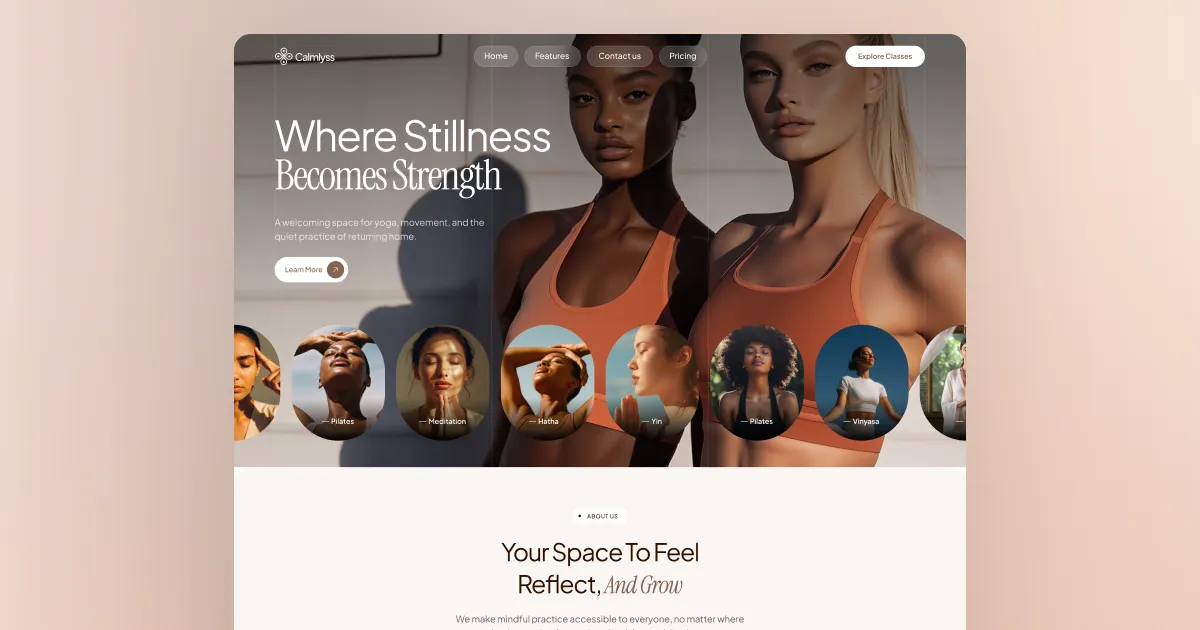
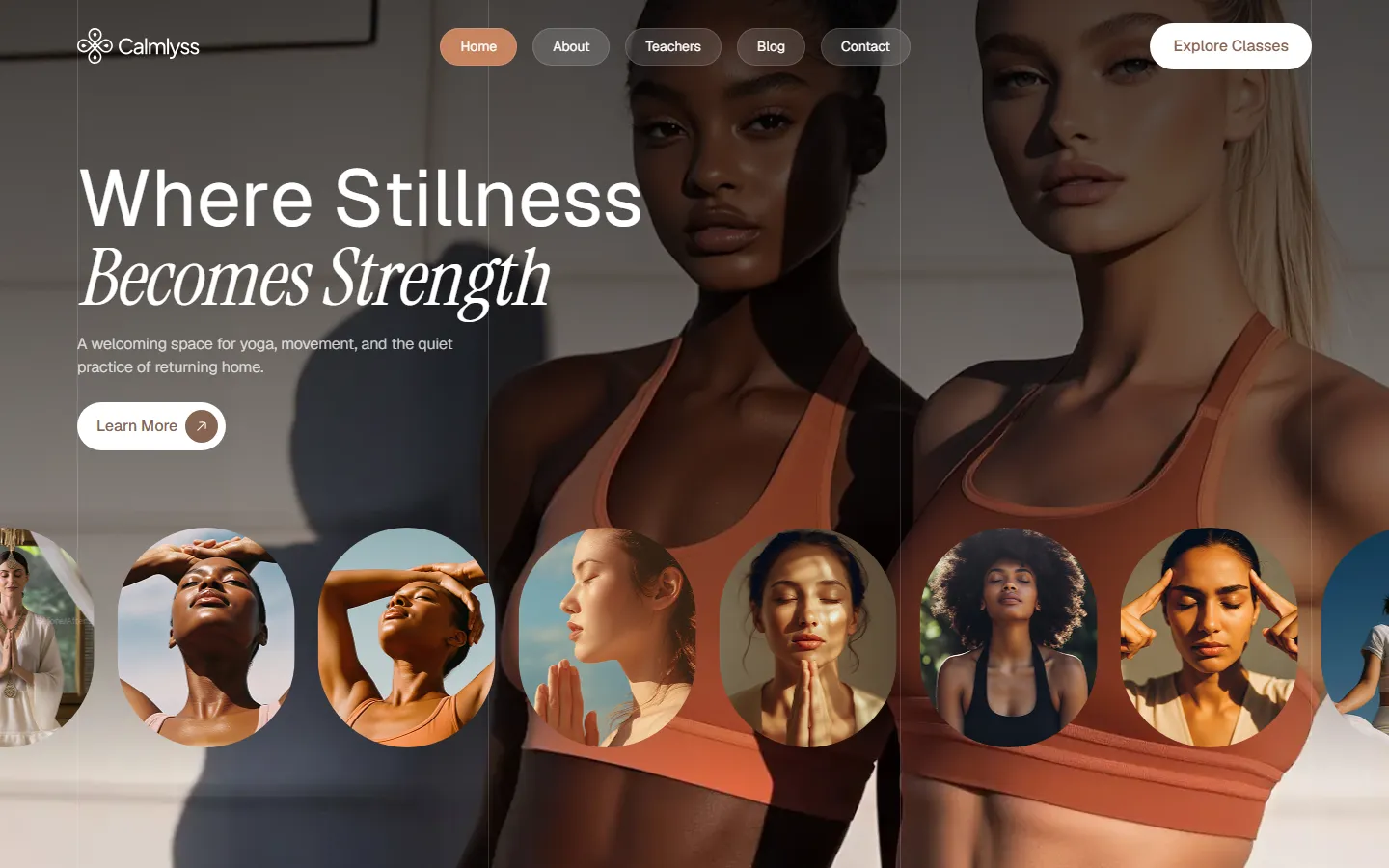
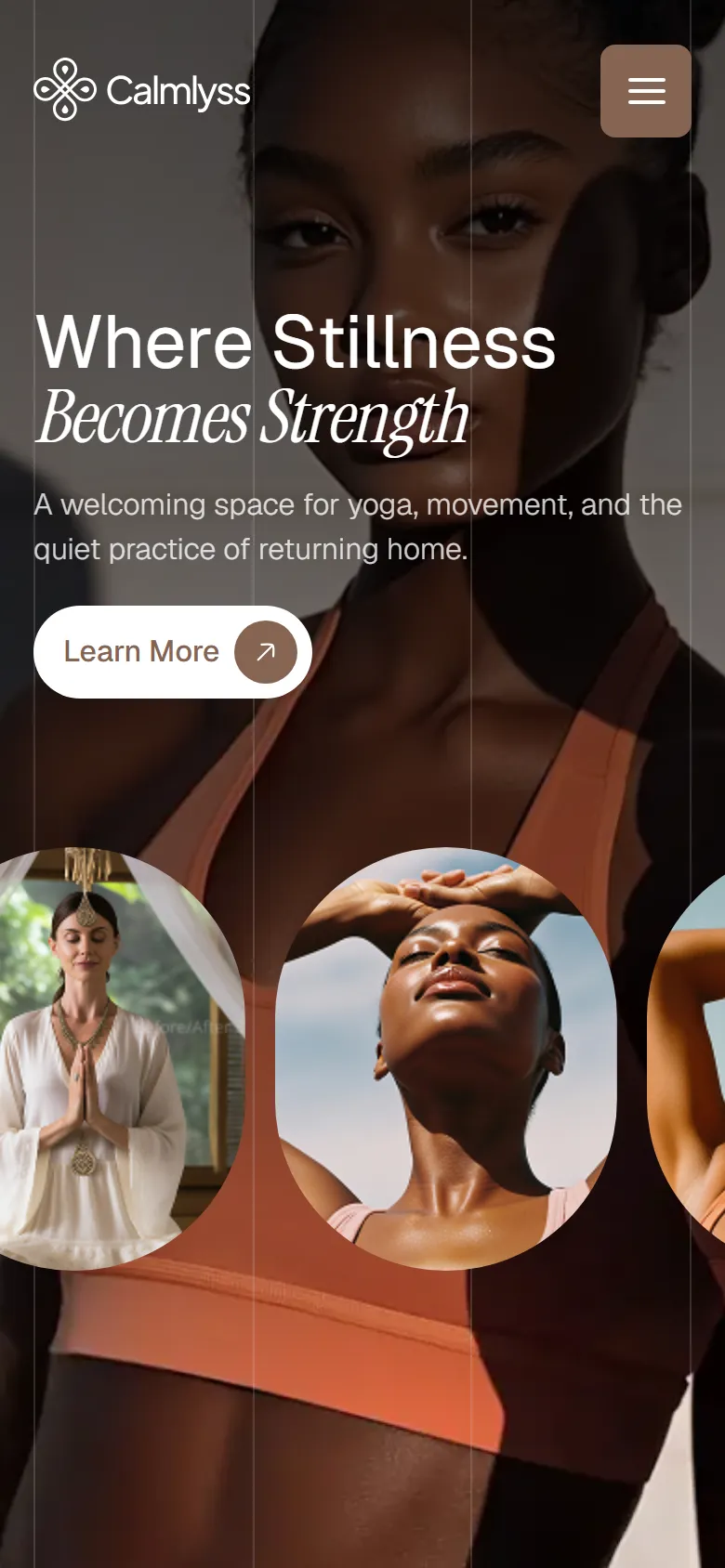
The homepage opens with a full-screen hero, "Where Stillness Becomes Strength", followed by sections that introduce your philosophy, featured classes, a weekly schedule, your teachers, pricing, a retreat gallery, testimonials and your latest articles. It works as a complete one-page pitch for your studio, so a visitor who never clicks past the homepage still understands what you offer and how to book.
Classes and Schedule
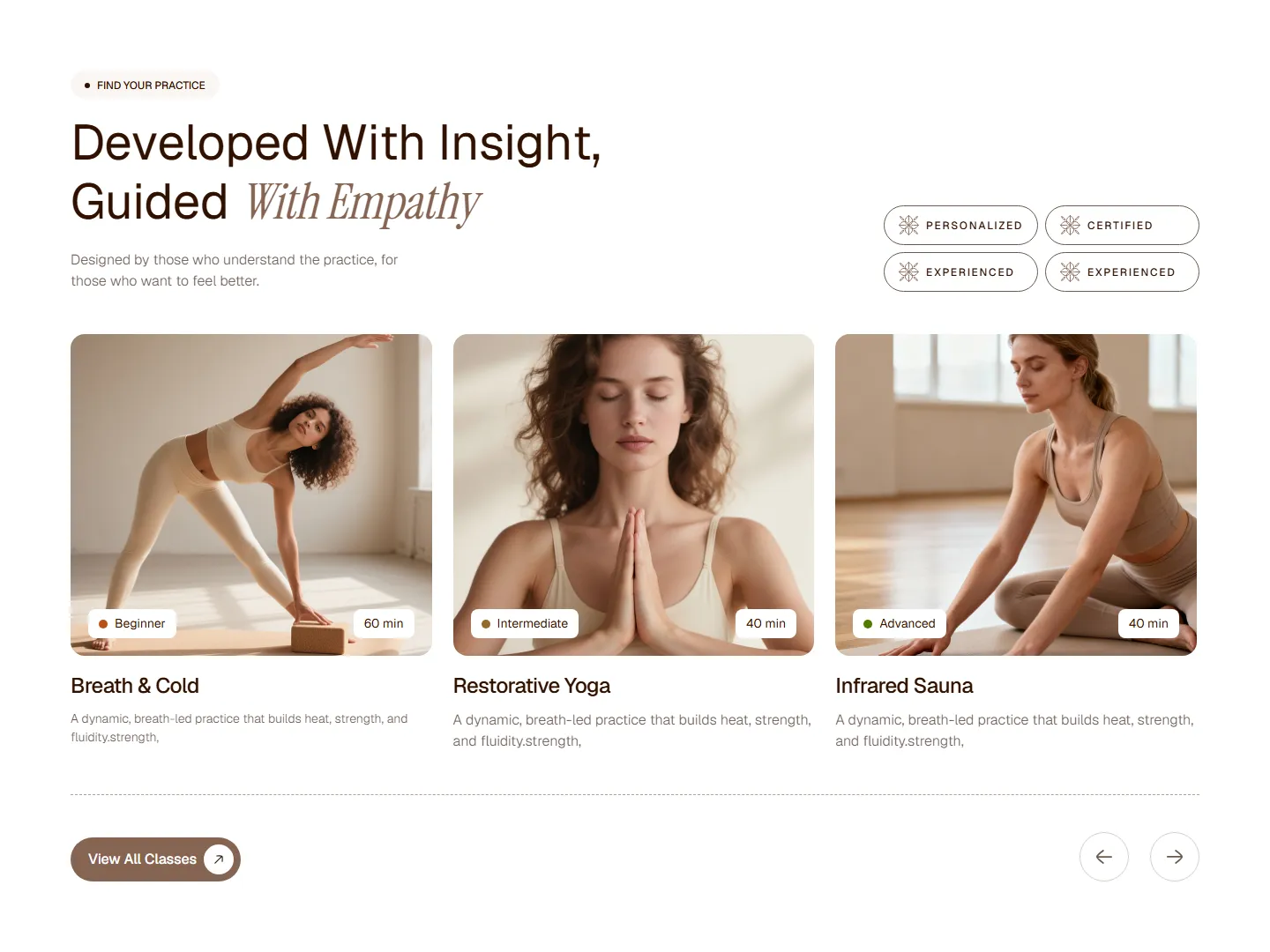
Class cards show the practice name, a short description, the level (Beginner, Intermediate or Advanced) and the session length, so visitors can find the right fit at a glance. The Classes page adds a quick comparison between paths, and every class has its own detail page with sections like "What is This Class?", "Who is it For?" and "Class Runs Like This" that answer questions before they are asked.
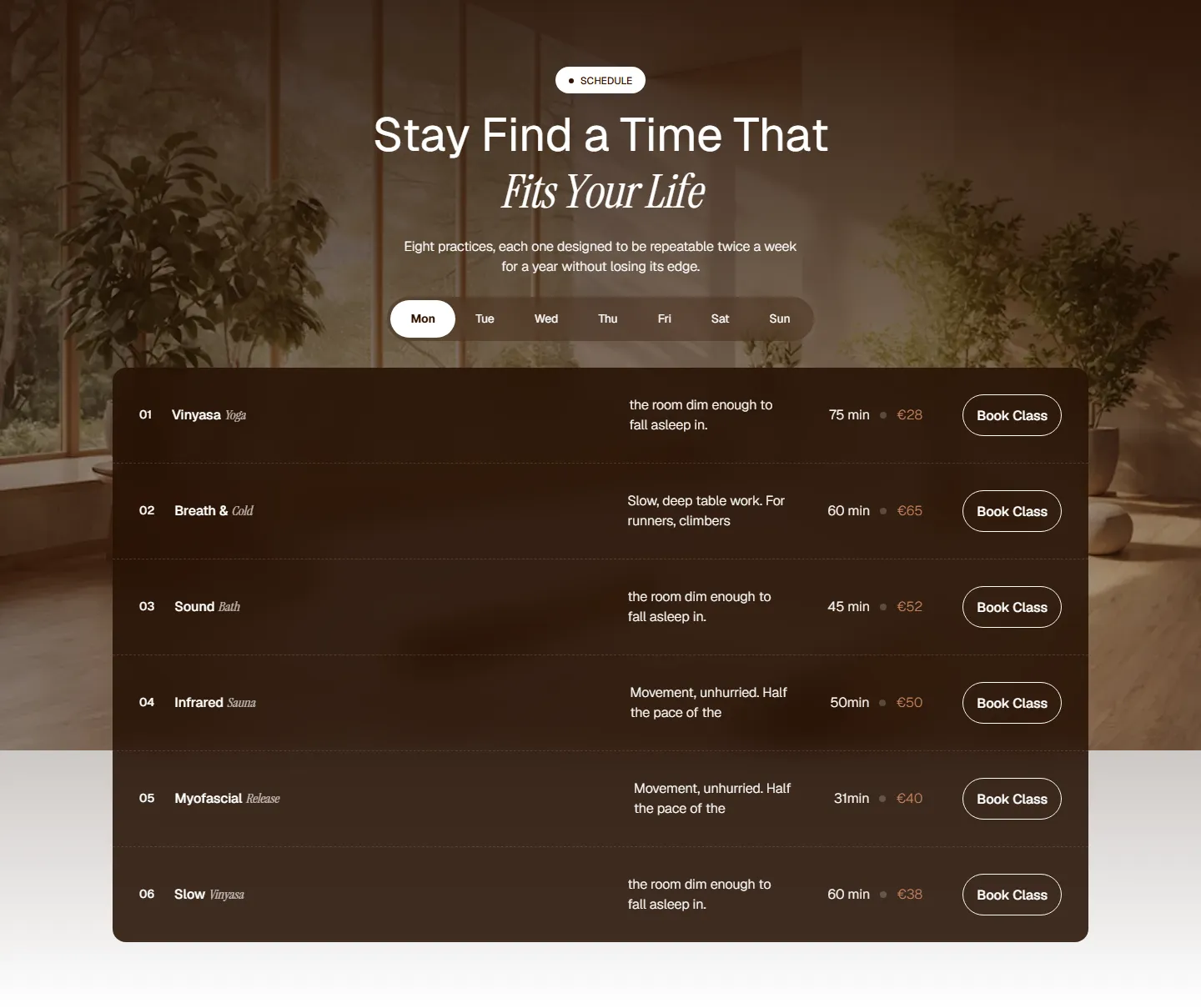
The schedule section lets visitors switch between the days of the week and see each session's duration, price and a "Book Class" button in one clean list. That answers the most common question a new student has, "when can I come?", without making them download a timetable or send a message. It also gives returning members a quick way to plan their week and book their next session.
Teachers
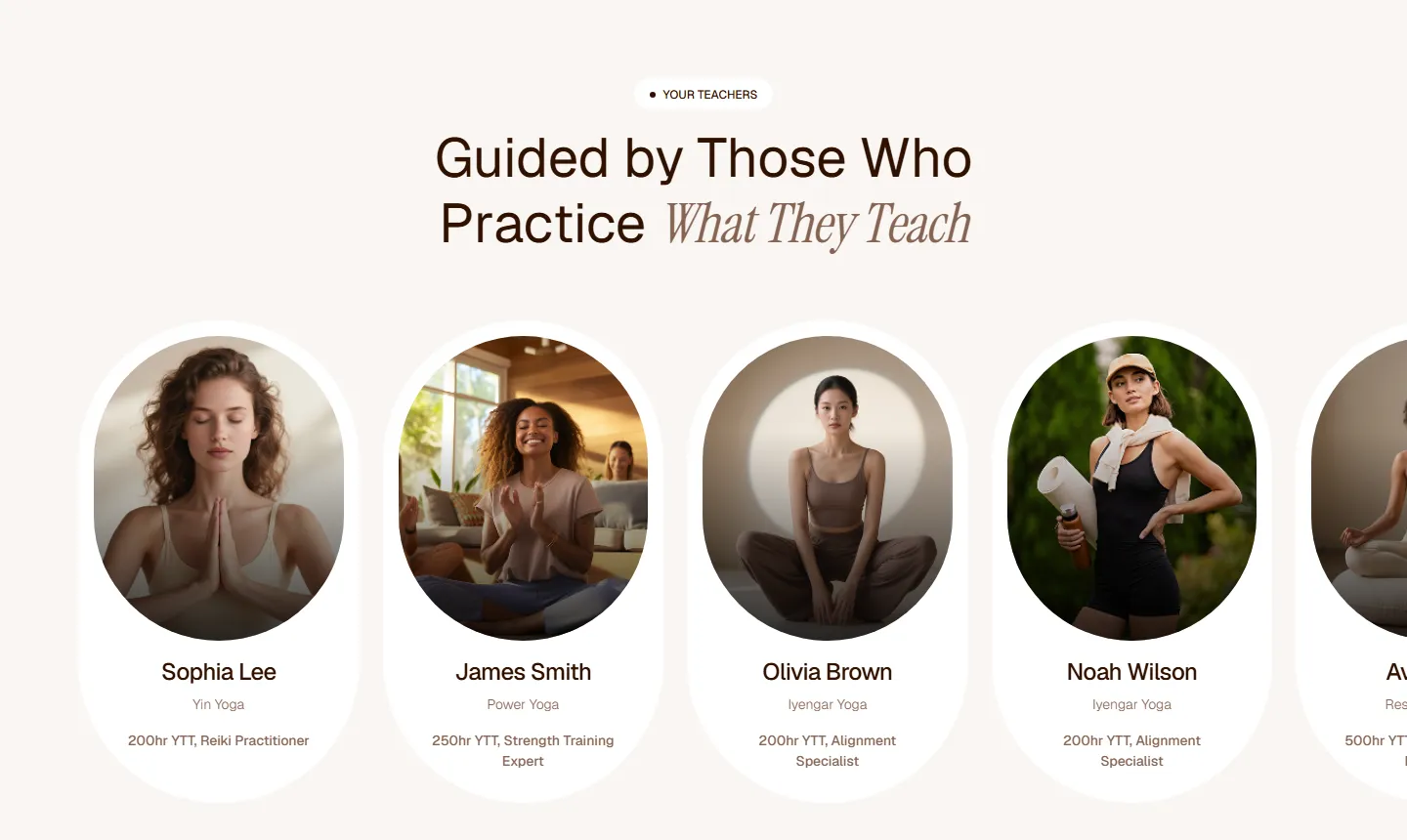
People choose a studio as much for the teacher as for the class. The Teachers page and its CMS profile pages show each instructor's photo, yoga style and certifications, such as 200-hour or 500-hour yoga teacher training, so new students know exactly who will guide them. Individual profiles give each teacher space to share their approach, which builds trust before the first session.
Pricing
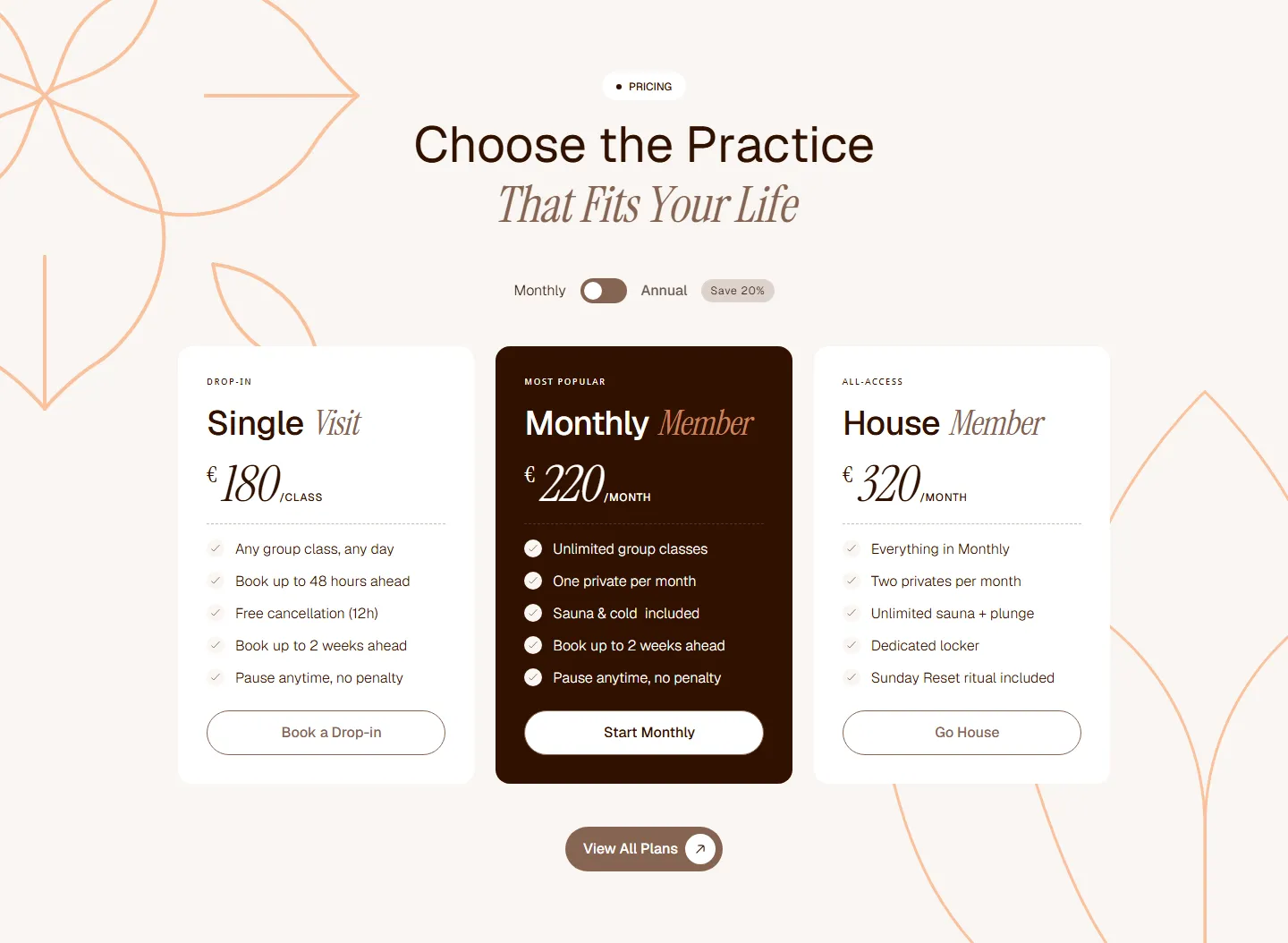
The Pricing page presents memberships, class packages and private session rates in clear plan cards, with a monthly and annual toggle and a highlighted "Most Popular" plan that guides people toward your best offer. A membership benefits section, testimonials and an FAQ then handle the last objections before someone signs up, so visitors don't have to contact you just to understand what's included.
Events
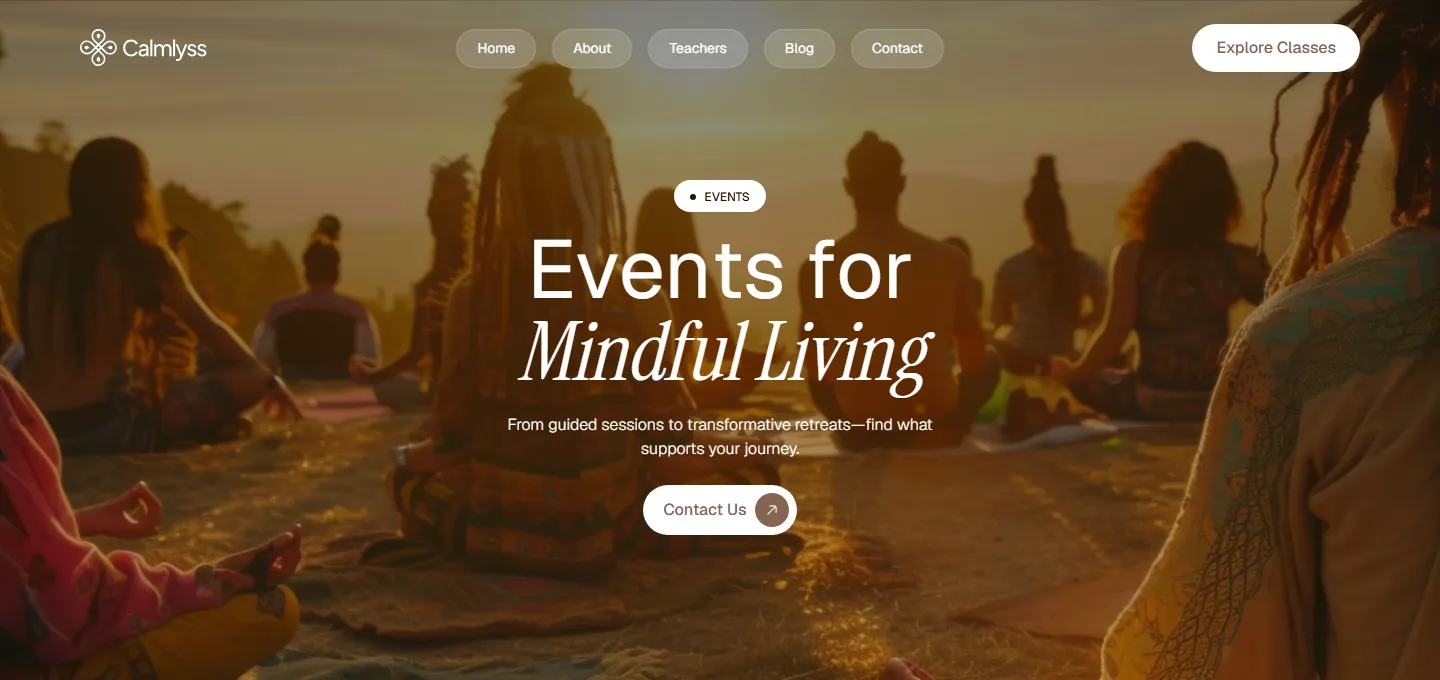
Retreats and workshops often bring in the highest-value bookings for a wellness business, so they deserve more than a line on the homepage. The Events page gives them a dedicated home, with an event listing and a gallery of past retreats that shows newcomers what the experience actually looks and feels like. It's an easy way to promote seasonal workshops, special sessions and community gatherings.
Blog
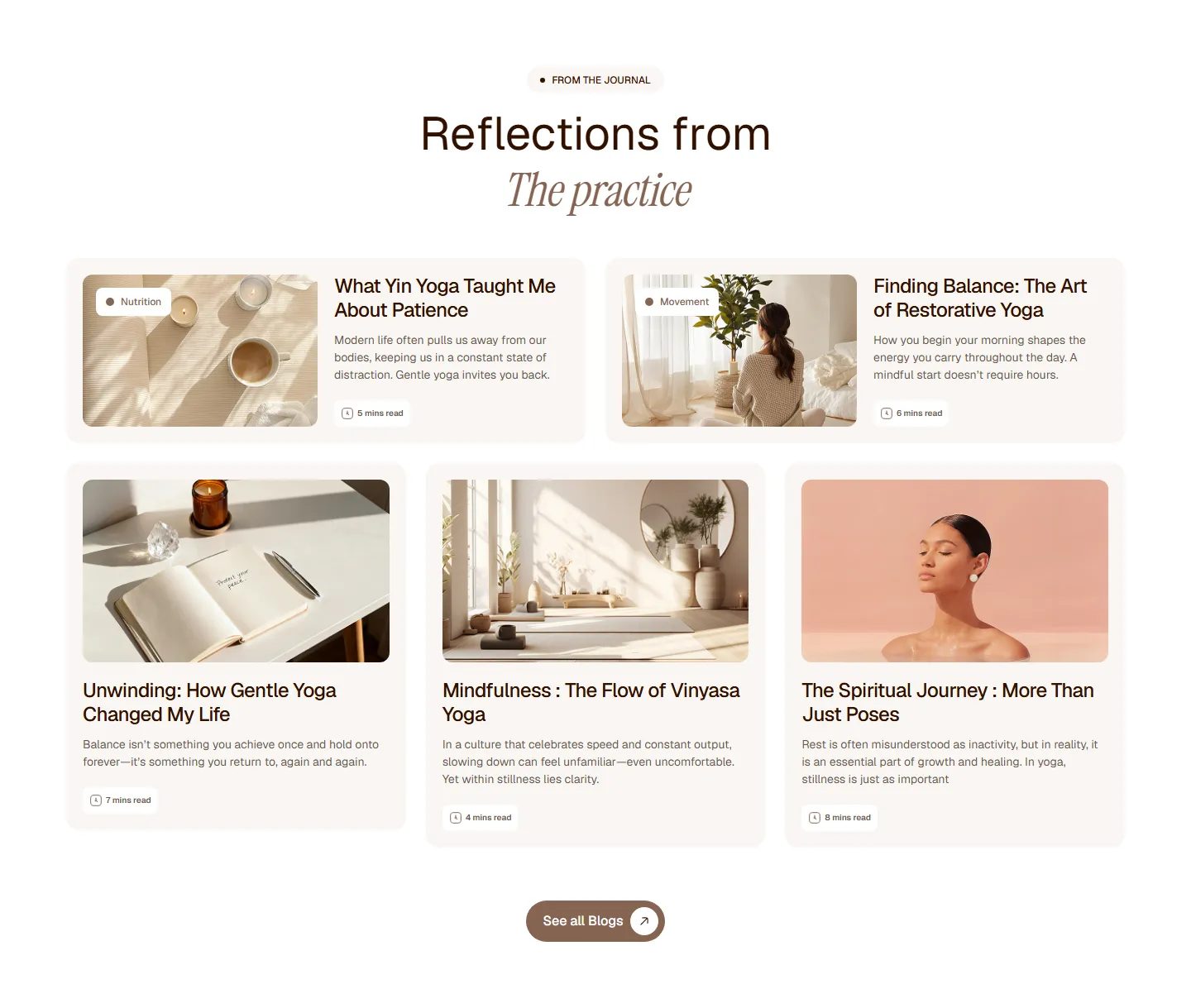
A CMS-powered blog lets you share wellness tips, yoga knowledge and mindfulness insights with your community. Article cards show a category label and reading time, which keeps the journal easy to browse. Regular, helpful articles also help your site appear in search results for the questions future students are already asking, so the blog becomes a steady source of new visitors over time.
About and Contact
The About page tells your story, values and approach, introduces your space and your teachers, and helps visitors understand what makes your studio different. The Contact page keeps things simple with a form and your contact details, so anyone with a question about classes, private sessions or retreats can reach you in a few seconds, from any device.
Utility pages
Calmlyss also includes the supporting pages a professional site needs: a Style Guide with typography, colors, buttons and spacing in one place, a Changelog, a Password page, a Licenses page and a custom 404 page. There is also an Instruction page that explains how the GSAP animations are set up, so you or your developer can adjust or remove them without guessing.
CMS Collections That Grow With Your Studio
The parts of a wellness business that change most often are already connected to the Webflow CMS, so day-to-day updates never require touching the design. Your front-desk team or a marketing assistant can keep the site accurate from the Webflow editor while the layout, spacing and styling stay exactly as designed. Three collections do most of the work:
Classes: add a new practice once and it appears on the Classes page with its own detail page.
Teachers: onboard a new instructor by filling in a profile, with no layout work.
Blog: publish articles straight from the Webflow editor.
Design, Animations and Performance
Calmlyss uses a soft, minimal, light visual style with an elegant pairing of a clean sans-serif and an italic serif accent, all loaded from Google's web font collection. Subtle GSAP-powered Webflow interactions add gentle movement as visitors scroll, without getting in the way of the content. Under the hood, the template follows Webflow best practices so it stays fast and easy to maintain:
Components and variables for consistent, fast edits across every page.
Responsive layouts for desktop, tablet and mobile, with a mobile-friendly navigation menu.
Retina-ready graphics and a clean structure optimized for performance and SEO.
CSS Grid layouts, forms, sliders and a custom 404 page.
How to Launch Your Wellness Website With Calmlyss
Going from purchase to a live site is a short, practical process, and most of the work is adding your own content rather than designing. The five steps below take you from first look to a published website, whether you're doing it yourself or handing it to a team member. Plan a little extra time for photography, because real images of your space make the biggest difference.
Step 1: Preview the demo
Browse the Calmlyss live demo on both desktop and your phone, and open the class, teacher and blog detail pages too. Check that the pages match how your business works, whether that's group classes, private sessions, memberships or retreats, and note which sections you'll use, rename or hide before you buy.
Step 2: Buy the template on Webflow
Purchase Calmlyss from the Webflow Marketplace. It's added to your Webflow account as a new project you can start editing right away, with all pages, CMS collections and styles in place. If your team designs in Figma, you can also email Ink Studio after purchase to request access to the Figma design file.
Step 3: Set your brand
Start with the color and typography variables, so your brand colors and fonts update across every page at once. Then swap the logo and favicon, and replace the demo photos with images of your own space, classes and teachers. Real photography matters more than any design detail, because it shows new students exactly what to expect when they walk in.
Step 4: Add your real content
Fill the Classes, Teachers and Blog collections with your own practices, instructor profiles and articles, then update the pricing plans to match your memberships and packages. Write your story and values on the About page, and connect your booking links to the "Book Class" buttons so every call to action leads straight to your scheduling or booking system.
Step 5: Set up SEO and publish
Before you go live, write a unique page title and meta description for each page, and add descriptive alt text to every image. Set up SEO fields for your CMS pages so each class, teacher and article has its own search snippet. Finally, connect your custom domain in Webflow and publish, then test the site on your phone one more time.
Calmlyss vs Building a Custom Wellness Website
A custom website gives you total freedom, but it usually takes weeks of design and development and costs far more than a template. Calmlyss gives you a professionally designed, CMS-ready foundation for a one-time $99, which you can customize as much or as little as you need. For most studios and coaches, that difference in time and budget is better spent on photography, content and marketing.
Starting with a template doesn't lock you in either. If you need extra pages, a booking integration or a fully tailored brand experience later, a Webflow developer can extend Calmlyss instead of starting from zero. Looking for a different feel? Ink Studio also offers Calmora, another wellness and yoga template, and you can compare both in the Ink Studio Webflow template collection.
Frequently Asked Questions
How much does Calmlyss cost?
Calmlyss is listed at $99 USD on the Webflow Marketplace, which is a one-time purchase for the template, and it's the same price shown in Ink Studio's template catalog. You'll still need a Webflow site plan to publish it on your own custom domain, which is billed separately by Webflow based on the plan you choose.
Who is Calmlyss designed for?
Calmlyss is designed for yoga studios, wellness coaches, holistic therapists and mindfulness centers. It works for solo instructors who need a polished first website and for growing studios with several teachers, a weekly class schedule, membership plans and regular retreats or workshops, because all of that content is managed through the CMS.
Can I preview Calmlyss before buying?
Yes. Every page is available on the live demo at calmlyss.webflow.io, including the class, teacher and blog detail pages, the pricing page and the events page. Browse it on your phone as well as your desktop to see how the layouts, navigation and animations adapt to smaller screens before you decide.
Does Calmlyss use the Webflow CMS?
Yes. Classes, Teachers and Blog are CMS collections, so you can add and update content from the Webflow editor without changing the layout. Each item gets its own detail page automatically, which keeps the site organized as you add more practices, instructors and articles, and gives every page its own search-friendly URL.
Can I customize Calmlyss without code?
Yes. Calmlyss is a native Webflow project built with components and variables, so you can change colors, fonts, images and content visually in the Webflow Designer. The Style Guide page shows every text style, color and button in one place, which makes it easy to keep your changes consistent across the whole site without writing any code.
Is the template mobile friendly?
Yes. Calmlyss is fully responsive across desktop, tablet and mobile, with a collapsing mobile navigation menu and touch-friendly sliders. Since many people discover yoga studios and wellness coaches on their phones through social media and search, the mobile layouts are designed to keep classes, schedules and booking buttons easy to reach.
Can I get the Figma file?
Yes. After you buy the template on the Webflow Marketplace, email Ink Studio to receive access to the Calmlyss Figma design file. Having the Figma file makes it easier for designers to plan new pages, create marketing graphics in the same style, or present layout changes to a client before building them in Webflow.
Final Words
Your studio already gives people a calm place to breathe, move and reset. Your website should do the same: show your classes and teachers clearly, answer the practical questions about times and prices, and make booking feel effortless. When the online experience matches the feeling of your space, more of the people who find you actually walk through the door.
Calmlyss gives you that foundation in a single Webflow project, ready for your photos, your classes and your story. Explore the live demo and get it on the Webflow Marketplace. If you'd like help customizing it, adding a booking integration or tailoring it to your brand, get in touch with Ink Studio.
Impressions and downloads are vanity metrics. These six UX indicators are the ones that actually tell you whether your product is working — and where it's quietly losing users.
6 mins read
Stop Losing Users to Bad UX
Book your free strategy call. We'll show you exactly where your product is leaking conversions — and how to fix it.
30 min · No obligation · Actionable insights guaranteed
Hafiz Ibrahim
CXL Certified, NN/g UX Certified, 10+ years in product design








.svg)
.svg)